BLACK FRIDAYKnight BundleKnight hosting · OX App Suite email · WP Nebula Core · NordVPN Standard
$99 USD per yearGet the bundle
We are aware of a potentially service impacting issue. Learn more

How to Delete Email Messages in Outlook 2021 Print

  • 0

You can easily remove email in Outlook 2021.


If you use the POP email protocol, the email will only be removed from Outlook 2021 and remain on the mail server. With IMAP, email is deleted on both Outlook 2021 and the mail server.


1. Open Outlook 2021.

outlook-2021-icon.gif


2. Go to Inbox, right-click on the message you want to remove and click on Delete.
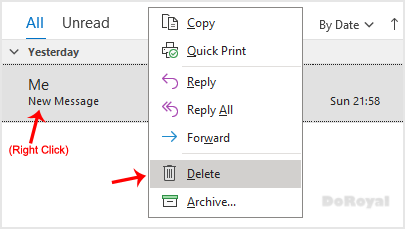
outlook-2021-delete-message.gif


Was this answer helpful?

« Back